Mac Explorer vs Path Finder — simplicity versus a full file-management workspace
Path Finder is a comprehensive modular workspace with dual-pane browsing and FolderSync. Mac Explorer is a focused, single-pane tool built around a Windows File Explorer workflow with an embedded terminal and Git.
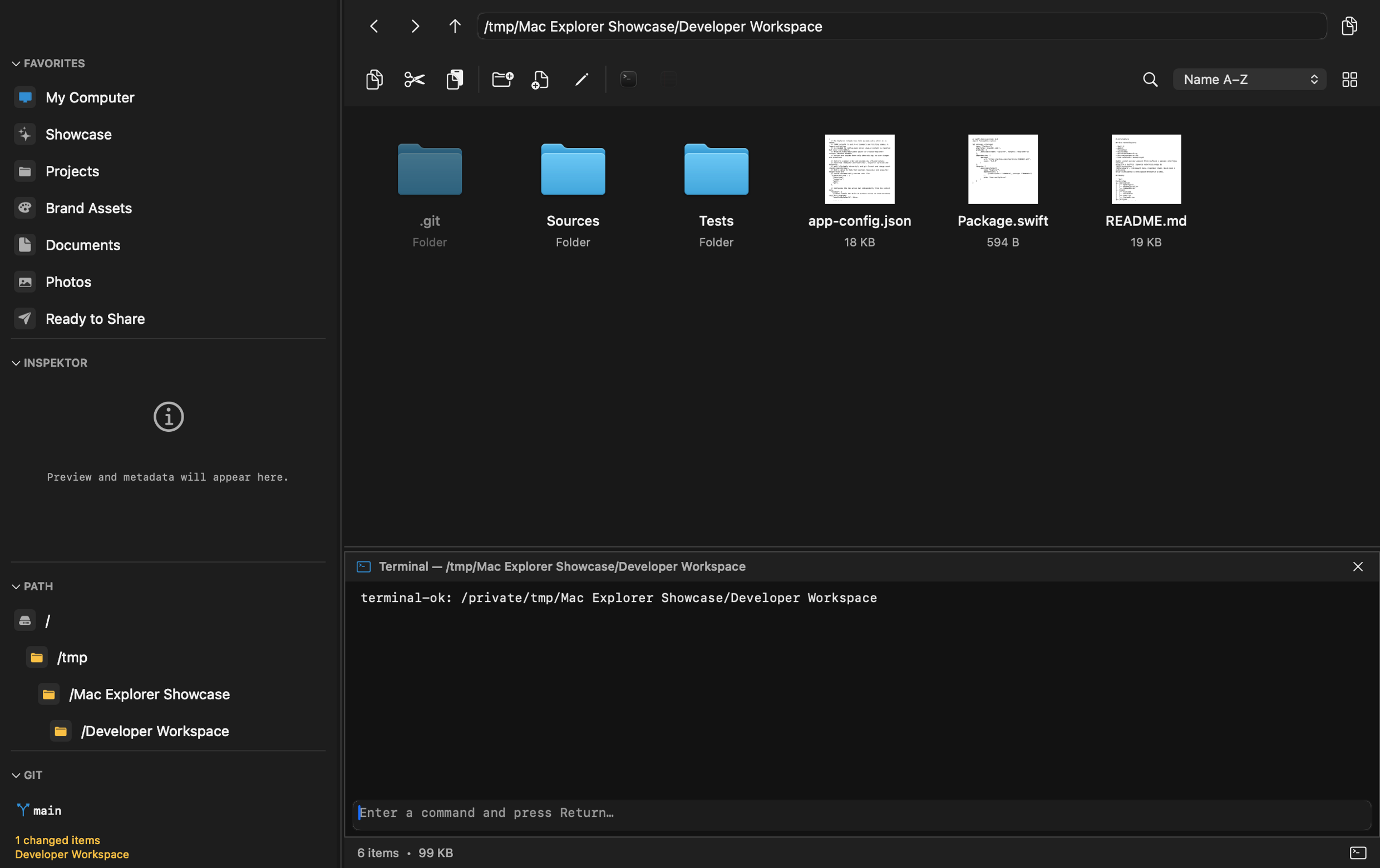
Mac Explorer is a fast, single-pane environment that is ready to use without first assembling a custom workspace. It combines familiar Windows File Explorer shortcuts with native AppKit, an embedded terminal, Git, RegExp filtering, technical metadata, and custom actions. The focus is deliberate: we optimize the tasks people perform every day instead of competing on the number of panes and modules.
Path Finder represents a broader, more configurable direction. It is one of the most established alternative file managers for Mac. Its history reaches back to the early days of Mac OS X, and the current app extends the idea of a "Finder for power users" with dual-pane browsing, modules, comparison and sync tools, and many operations not available together in the system Finder.
What makes Path Finder appealing
Path Finder suits people who want to build a complete file-management workspace. Its interface can use one or two panes, while configurable modules place additional information and tools around the file area. You can create a minimal layout or a feature-rich command center.
Its major capabilities include:
- dual-pane copying and moving;
- Drop Stack, a temporary shelf for gathering files before an operation;
- FolderSync for comparing and synchronizing folders in one or both directions;
- batch rename, advanced selection, merging, and comparison tools;
- Size Browser and hierarchical views for locating large items;
- archive support and an operation queue;
- bookmarks and tab presets;
- browsing files on an iPhone connected over USB;
- Dropbox integration, hidden-file tools, and secure deletion;
- modules such as Terminal, Preview, file information, and a hex editor.
This is a substantial toolkit and a real advantage when you regularly synchronize directory trees, work between two locations, or want several specialized tools in one window.

Where Mac Explorer takes a different path
Mac Explorer does not compete on module count. It remains deliberately single-pane, without tabs or a dedicated synchronization layer. The interface is designed to be clear from the first launch, with no need to build a custom dashboard.
The difference is easiest to feel during everyday navigation. Enter,
Backspace, Delete, and F2 follow the Windows model. The address bar
combines breadcrumbs with direct path editing, while mouse buttons 4 and 5
navigate through history. "My Computer" shows favorites, volumes, storage use,
and recent files.
Mac Explorer also concentrates on a local developer workflow:
- the terminal is embedded at the bottom of the window and follows the current folder;
- Git appears only inside a repository, showing its branch and status and allowing safe branch switching;
- filenames in the current directory can be filtered live with regular expressions;
- MIME type,
chmod, owner, and group are visible without opening a separate module; - custom actions can be defined in JSONC, placed in the toolbar or context menu, and filtered by file type or RegExp;
- expensive data is loaded only when needed, and stale work is canceled after a folder, selection, or viewport change.
Path Finder offers a much wider range of specialized file operations. Mac Explorer instead shortens a carefully chosen set of frequent tasks while keeping startup, memory use, and configuration overhead low.
Price, licensing, and privacy
Path Finder's official store lists $32.95 for one year, $55.95 for two years, and $122.95 for five years. Its current terms describe time-limited licenses: when the term ends, continued use requires another license or subscription. One license includes three activations, and the full trial lasts 30 days.
Mac Explorer costs $9.99 for two devices. It is a perpetual purchase for the
1.x release line and includes a 30-day trial. The offer is considerably
simpler and less expensive, although Path Finder includes many more specialized
features.
Both products state that they do not collect application usage analytics. Path Finder's policy says that the app connects periodically to validate its subscription, while purchase data is handled by Cocoatech and payment providers. The Mac Explorer core has no telemetry, account, or general-purpose networking layer; its separate licensing and update components communicate only within their defined scope. The distinction is not a simple "private versus non-private" label, but Mac Explorer has a smaller network surface and does not require periodic renewal of the right to use the app.
Which app is right for you?
Choose Path Finder if you
- rely on dual-pane file management for copying and moving;
- need folder synchronization, Drop Stack, or built-in batch operations;
- want to arrange a window from many specialized modules;
- browse a connected iPhone or use Path Finder's dedicated integrations;
- prefer one expansive tool over several focused ones.
Try Mac Explorer if you
- want the Windows File Explorer model rather than a classic dual-pane manager;
- prefer an interface that does not require building your own layout;
- mainly work with local projects, terminals, and Git;
- value live RegExp filtering, technical metadata, and custom scripts;
- care about a low purchase price and a small native app;
- do not need synchronization, advanced archive handling, and iPhone browsing in the same program.
Comparison table
| Feature | Mac Explorer | Path Finder |
|---|---|---|
| Core philosophy | Lightweight, single-pane Windows File Explorer workflow | Modular, comprehensive file-management workspace |
| Price | $9.99 one-time, 2 devices, perpetual for version 1.x | From $32.95 for a one-year term with 3 activations |
| Trial | 30 days | 30 days, full functionality |
| Windows shortcuts and behavior | A central part of the product | Customizable, but not its primary positioning |
| Terminal | Embedded, launched lazily, with the current cwd | Available as a module or separate window |
| Git | Contextual status, branch, and branch switching | Tools depend on modules and configuration; not a primary product-page feature |
| RegExp | Live filename filter for the current folder | Filtering and advanced selection, but not the same documented workflow |
| Technical metadata | MIME type, chmod, owner, group, and a rich Inspector | Broad information modules and tools, including a hex editor |
| Custom actions | Apps and scripts in the toolbar or context menu, with type and RegExp filters | Extensive module and settings system |
| Configuration | Native settings panel and readable, comment-preserving JSONC | Extensive settings interface and configurable modules |
| Privacy | No core account or telemetry; file names and contents remain local | No declared usage analytics; periodic license validation and purchase data handled by providers |
| Performance | Native AppKit, lazy work, and bounded caches; documented 284.21 ms to first window | Native Apple Silicon support; the developer emphasizes optimization without a shared benchmark |
| Layout and synchronization | One focused pane; mounted network volumes appear like local ones | One or two panes, tabs, Drop Stack, and FolderSync |
| Batch operations and archives | Included or custom script actions | Extensive built-in features |
| Best for | Windows switchers and developers looking for a focused tool | Power users who need dual-pane work, synchronization, and modules |