Mac Explorer vs QSpace — a focused Explorer or the most flexible Finder?
QSpace expands Finder with up to 12 pane layouts, tabs, and deep personalization. Mac Explorer is a single-pane Windows File Explorer workflow with an embedded terminal, Git, and live RegExp filtering.
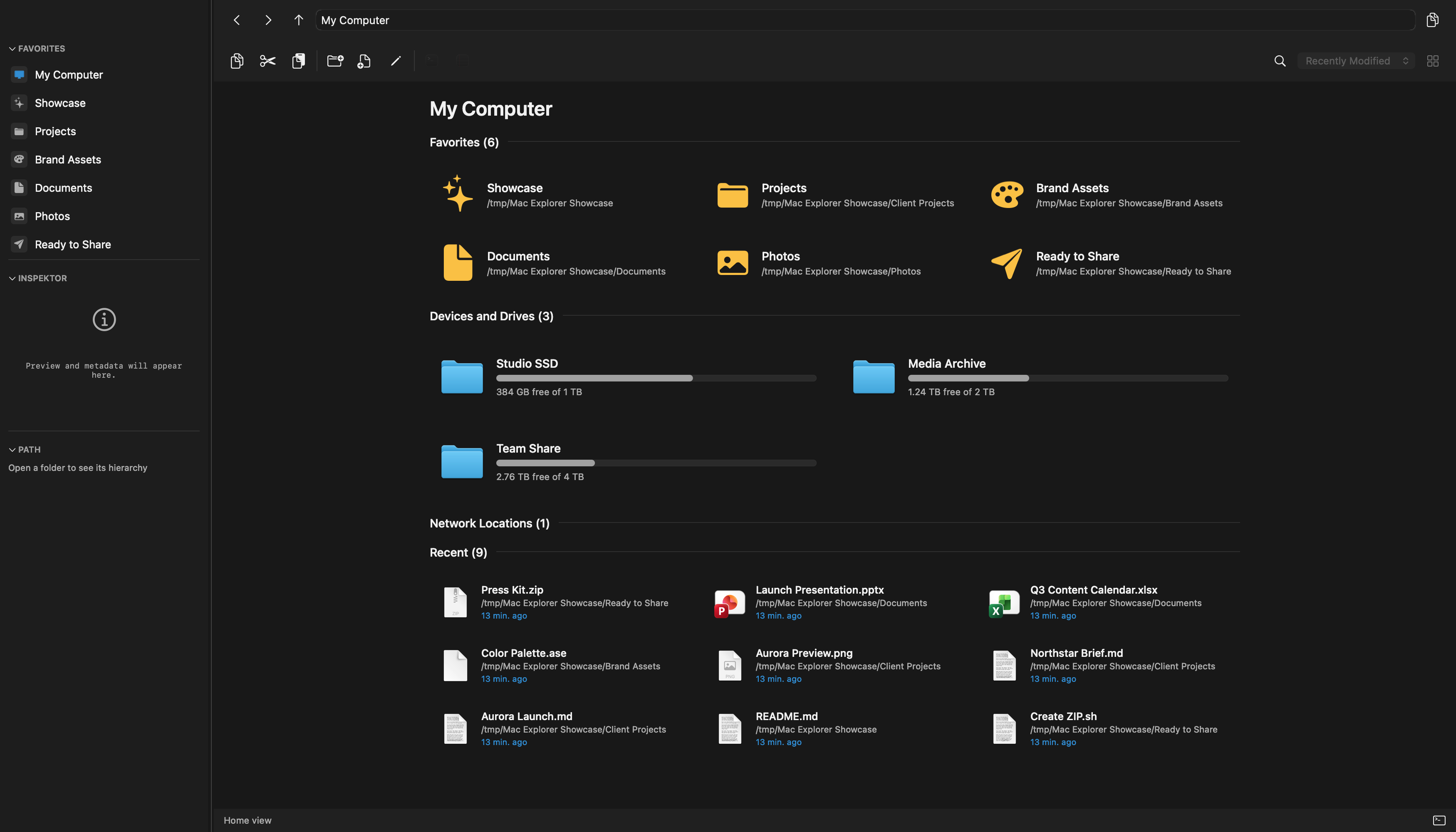
Mac Explorer begins where many Windows users run out of patience with changing old habits. It provides one clear pane, familiar shortcuts, an editable address bar, and "My Computer," then adds an embedded terminal, Git, RegExp filtering, technical metadata, and custom actions. There is no multi-pane workspace to assemble — its strength is a coherent workflow available from the start.
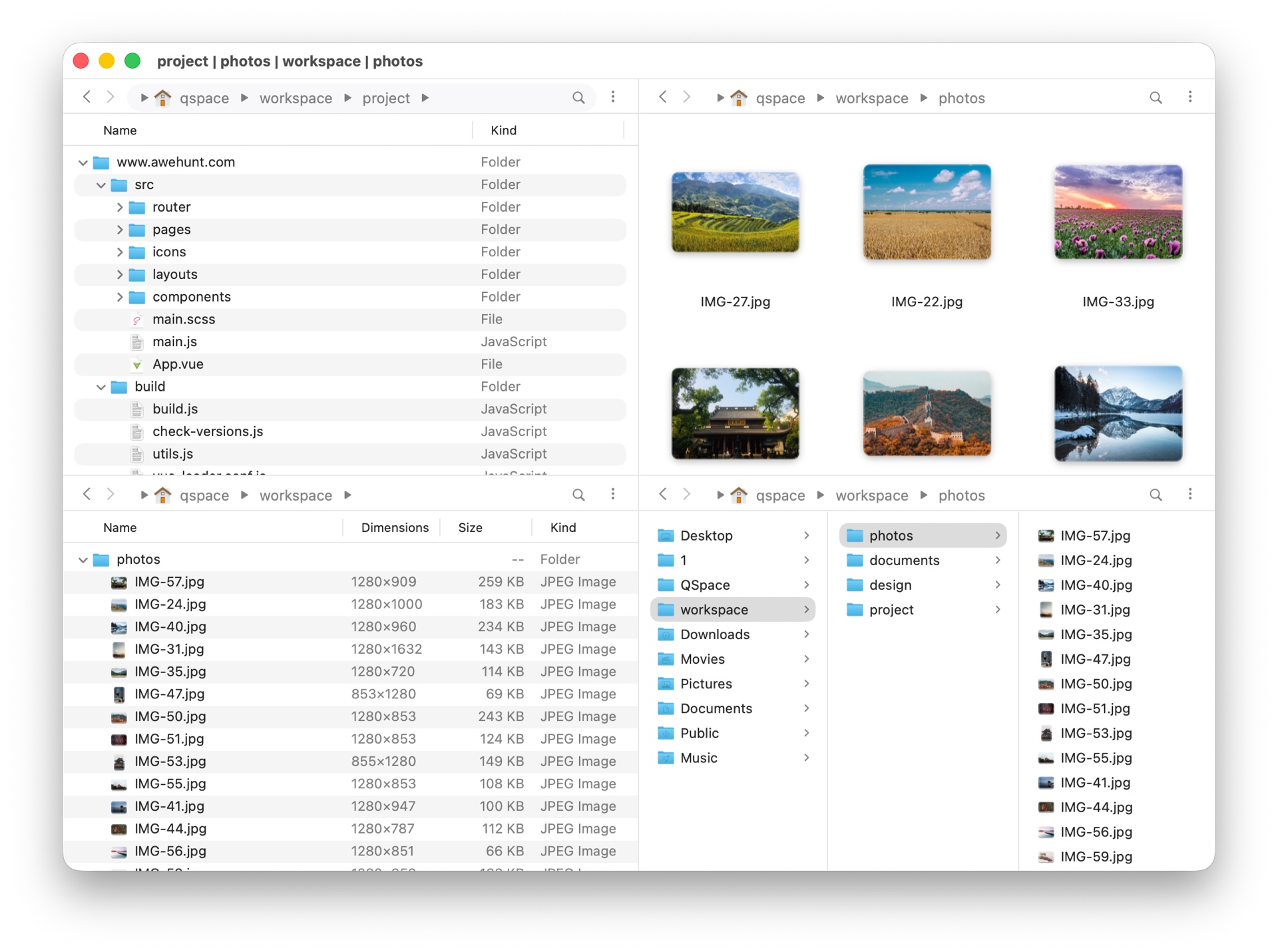
QSpace calls itself a better Finder and expands Finder's visual language with up to 12 pane layouts, a sophisticated address bar, tabs, view styles, and extensive personalization. It starts from a different premise than Mac Explorer: maximum layout flexibility instead of one deliberate model.
What QSpace offers
QSpace's signature feature is switching among 12 layouts. Several folders can sit side by side for comparison and copying, while every pane supports tabs. Its interactive address bar offers autocomplete, expandable path segments, and drag-and-drop directly onto a destination in the path.
The app extensively customizes appearance, columns, toolbar, context menu, shortcuts, and behavior. It includes view styles, a side preview, Spotlight search, tags, new files from templates, multiple hash algorithms, and Quick Launch for apps and tools. A Windows key-binding profile creates useful common ground with Mac Explorer.
Optional paid extensions add Stash Shelf, advanced batch rename with optional RegExp, server and cloud connections, and archives browsed like folders. Their availability differs between the Mac App Store edition and QSpace Pro.
What is unique about Mac Explorer
Mac Explorer has no tabs or multiple panes. One window remains a fast, clear view of the current directory. Windows behavior is not an optional preset but the product's foundation, together with "My Computer," mouse Back and Forward buttons, and familiar selection behavior.
Compared with QSpace, Mac Explorer particularly stands out through:
- a genuinely embedded terminal that launches lazily and follows the folder;
- contextual Git status, branch information, and branch switching;
- a live filename RegExp filter available immediately with
Cmd+Shift+F; - MIME type,
chmod, owner, and group columns; - an Inspector with rich image, PDF, and document metadata;
- local scripts as first-class toolbar and context-menu actions, filtered by file type and name;
- a core with no account, telemetry, or transmission of file names or contents.
QSpace can open an external terminal or editor. Mac Explorer keeps the terminal inside the same window, which is more convenient for frequent short sessions. QSpace has the advantage when several locations must remain visible at once or when tabs and optional remote-service extensions define the workflow.
Price and privacy
QSpace's official pricing page lists the Mac App Store edition at a promotional $12.99, reduced from $27.99, before extensions. It is a one-time purchase, but this edition has no trial or developer-provided refund. Mac Explorer costs $9.99 for two devices and includes a 30-day trial.
QSpace's policy lists app version, account email, macOS version and language, IP address, user and device identifiers, and payment-related data. The developer says this information is used only for QSpace functionality and is not shared except as required by external services. Mac Explorer has a smaller data model: its core requires no account and contains no telemetry. That is a clear privacy advantage, although QSpace's policy does not state that the app reads or uploads the contents of local files.
Which one is for you?
QSpace suits people who like Finder but want multiple panes, tabs, a powerful address bar, and deep personalization. Mac Explorer suits Windows switchers and developers who prefer one pane, terminal and Git context, and a simple catalog of their own scripts. The workflow matters more here than a small price difference.
Comparison table
| Feature | Mac Explorer | QSpace (Mac App Store) |
|---|---|---|
| Inspiration | Windows File Explorer | Finder expanded with panes and personalization |
| Price | $9.99 / 2 devices | $12.99 promotional, $27.99 regular; extensions sold separately |
| Trial | 30 days | None for the Mac App Store edition |
| Windows shortcuts | Default product model | Available as a settings profile |
| Address bar | Breadcrumbs plus direct editing with Cmd+L | Autocomplete, expansion, and drag-and-drop |
| Terminal | Embedded panel | Opens an external terminal, depending on edition |
| Git | Contextual sidebar section | No comparable built-in section on the features page |
| RegExp | Instant filename filter | Available in features such as the Advanced Batch Rename extension |
| Technical metadata | MIME type, chmod, owner, group, and rich Inspector | Configurable columns and side preview |
| Custom actions | Apps and scripts in toolbar or context menu, with type and RegExp filters | Quick Launch and extensive menu and toolbar customization |
| Configuration | Native panel plus comment-preserving JSONC | Extensive interface, style, and behavior settings |
| Privacy | No core account or telemetry | Policy lists account email, IP, and user and device identifiers |
| Panes, tabs, and extensions | One focused pane; core features require no add-ons | Up to 12 layouts and tabs; servers, clouds, and archives require extensions |
| Best for | Focused Windows workflow, terminal, Git, and automation | Multi-pane work, tabs, and extensive personalization |