Mac Explorer vs QSpace Pro — a focused specialist or a configurable powerhouse?
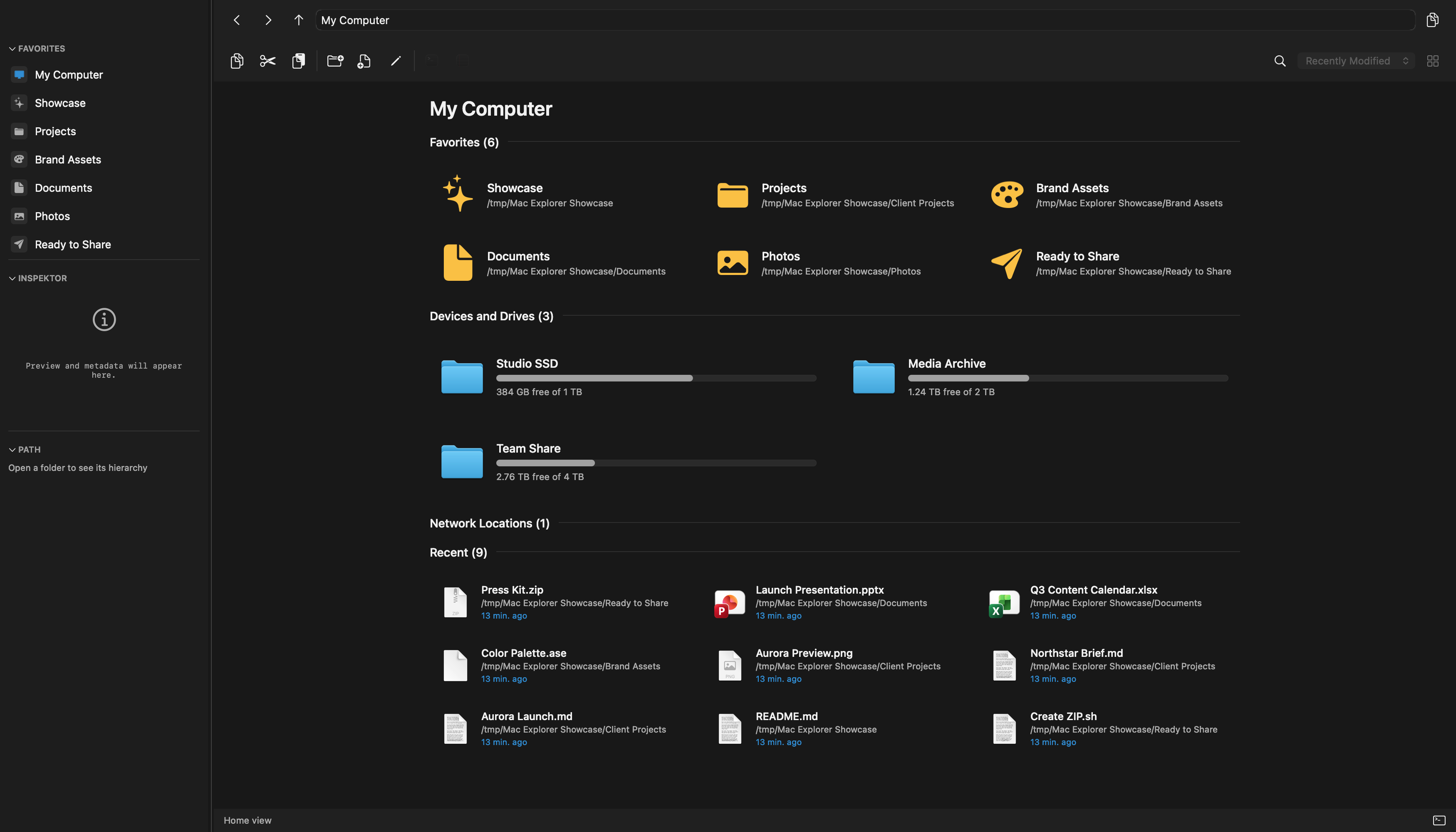
QSpace Pro offers 12 pane layouts and separately paid server and archive extensions. Mac Explorer focuses on a single-pane Windows workflow, terminal, and Git, with 140+ sources included in the standard price.
Mac Explorer is a complete, coherent environment for file management. One pane, Windows behavior, an embedded terminal, Git, RegExp, technical metadata, and custom actions form a toolkit that does not need to be assembled from paid extensions. We prioritize fast access, low overhead, and a clear interface over the largest possible number of layouts.
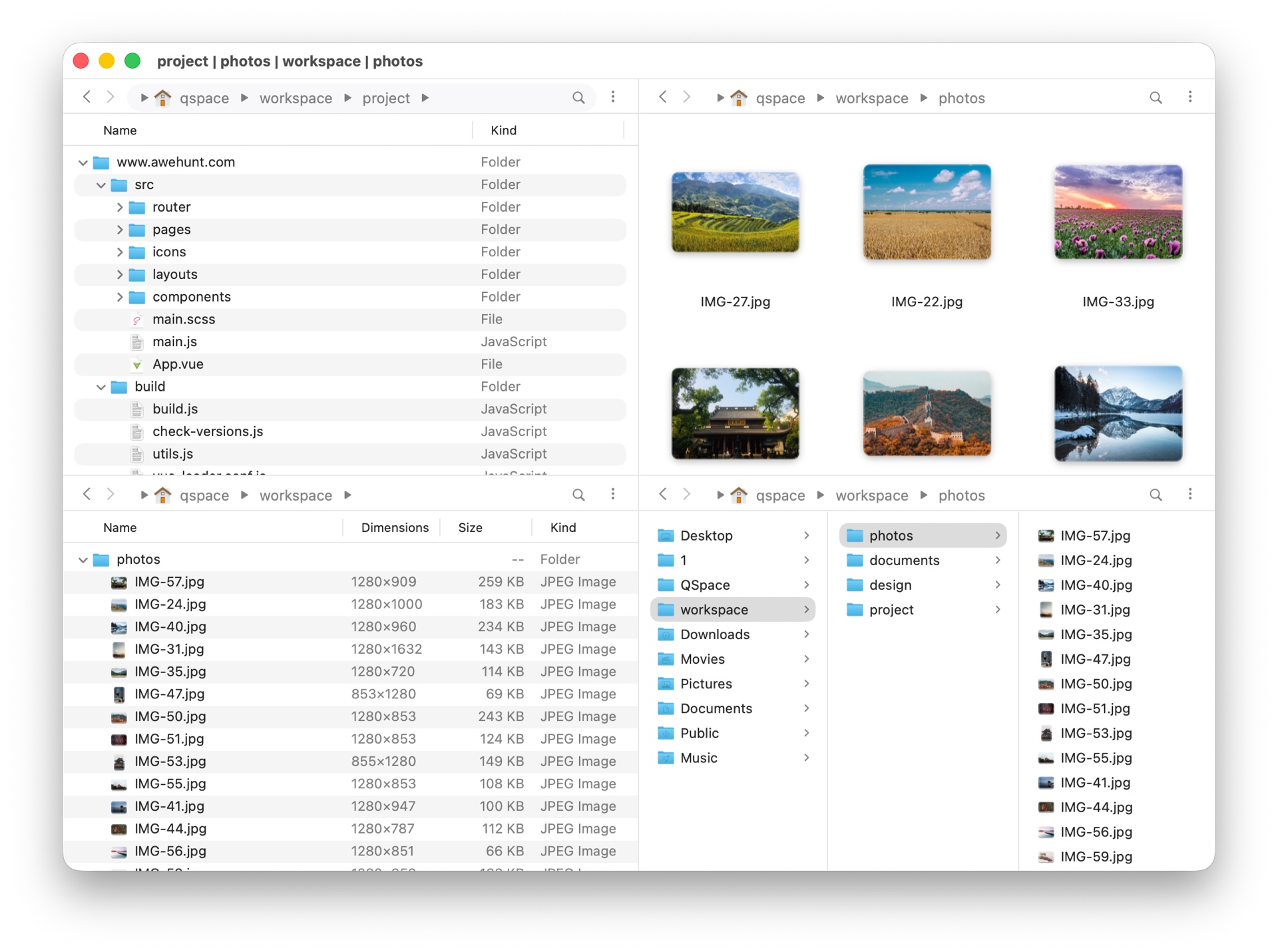
QSpace Pro is the fuller, non-Mac-App-Store edition of QSpace. Free from App Store sandbox restrictions, it supports deeper file management, Services, command-line programs, multiple terminals, QSpace Desktop, and optional extensions. It is one of the most configurable file managers for Mac and represents a more modular approach.
QSpace Pro's biggest strengths
QSpace Pro combines up to 12 pane layouts with tabs, a sophisticated address bar, view profiles, side preview, and detailed control over toolbars, menus, shortcuts, fonts, colors, and columns. Windows Key Bindings ease a platform switch, while Quick Launch runs apps and CLI tools.
The Pro edition can use QSpace Desktop and deeper system integrations. Optional extensions provide:
- Server Connections for FTP, SFTP, WebDAV, Dropbox, OneDrive, Google Drive, S3, SMB, NFS, AFP, and other services;
- Enhanced Archiver for browsing archives as folders;
- Advanced Batch Rename with composable rules and RegExp;
- Stash Shelf for temporarily gathering files from disks, servers, networks, and the clipboard.
Hashes, file templates, Spotlight Search, tags, rich columns, and opening a folder in a chosen terminal or editor round out a highly configurable system.
Why Mac Explorer remains different
Mac Explorer has no tabs, replacement desktop, or separately paid modules. Its advantage is focus and consistent context:
- Windows behavior is the default, not an optional profile;
- the terminal is embedded rather than opened as an external app;
- Git shows branch and status and supports branch switching;
- RegExp filters the visible folder as you type;
- list view displays MIME type,
chmod, owner, and group; - scripts become visible toolbar and context-menu actions with shortcuts;
- the core has no account or telemetry; remote connections are user-configured.
When work extends beyond local disks, Mac Explorer also connects to more than 140 cloud drives, object stores, remote servers, and protocols, including FTP, SFTP, WebDAV, S3, Google Drive, Dropbox, and OneDrive. Those connections are included in the standard $9.99 license; QSpace Pro sells Server Connections separately.
QSpace Pro is functionally broader. Mac Explorer is faster to learn and calmer to use when you do not want to manage panes, extensions, and dozens of options.
Price, extensions, and privacy
QSpace Pro's promotional $13.99 price is competitive, while its official page also lists a regular price of $29.99. Server Connections, Stash Shelf, and Advanced Batch Rename cost extra. QSpace Pro allows two active devices and includes a 30-day trial.
Mac Explorer costs $9.99 for two devices with no separately paid modules. Its 140+ cloud, storage, and server sources are included. QSpace Pro's separate Server Connections purchase accompanies its multi-pane and modular approach; QSpace's archive browser remains another separately priced extension.
QSpace's policy lists account email, IP address, macOS version and language, user ID, and device ID. Mac Explorer requires no account and has no telemetry in its core. QSpace says it does not share collected information beyond the needs of its features and external services; there is no basis for claiming that it uploads local file contents.
Which one is for you?
QSpace Pro suits power users building one configurable center around multiple panes, extensions, archives, and batch rename. Mac Explorer suits people who want a Windows File Explorer workflow, terminal, and Git without the weight of that command center. If you also need access to 140+ local and remote sources without assembling a layout or buying modules, start with Mac Explorer's 30-day trial.
Comparison table
| Feature | Mac Explorer | QSpace Pro |
|---|---|---|
| Approach | Focused, single-pane | Multi-pane, modular workspace |
| Price | $9.99 / 2 devices, no paid modules | $13.99 promotional / $29.99 regular, add-ons separate, 2 devices |
| Trial | 30 days | 30 days |
| Windows key bindings | Default model | Optional profile |
| Terminal | Embedded and synchronized | Opens external terminals |
| Git | Built-in sidebar | No comparable section in the main feature catalog |
| RegExp | Immediate current-folder filename filter | Included in features such as the paid Advanced Batch Rename extension |
| Technical metadata | MIME type, chmod, owner, group, and rich Inspector | Rich columns and side preview |
| Custom actions | Scripts and apps in toolbar and context menu, GUI plus JSONC, type and RegExp filters | Quick Launch, CLI tools, and extensive UI customization |
| Privacy | No core account or telemetry | Policy lists email, IP, user ID, and device ID |
| Panes and tabs | One focused pane | 12 layouts, tabs, and workspaces |
| Servers and cloud storage | 140+ sources included in the base price | Available through a separately paid extension |
| Archives and batch rename | Actions and system tools | Available through separately paid extensions |
| Best for | A simple Windows workflow across local and remote sources | Multi-pane work, extensions, archives, and maximum customization |