Mac Explorer vs Windows File Explorer — a familiar workflow on another operating system
Windows File Explorer is not available on macOS, but Mac Explorer recreates its interaction model natively: Enter, Backspace, Delete, F2, an editable address bar, and My Computer — plus an embedded terminal and Git.
Mac Explorer was created so that moving from Windows to Mac does not mean
giving up the best file-management habits. Enter, Backspace, Delete,
F2, an editable address bar, "My Computer," and mouse history buttons work in
a native macOS app. It goes beyond recreating the familiar model by adding an
embedded terminal, Git, RegExp, technical metadata, and local automation in
the same window.
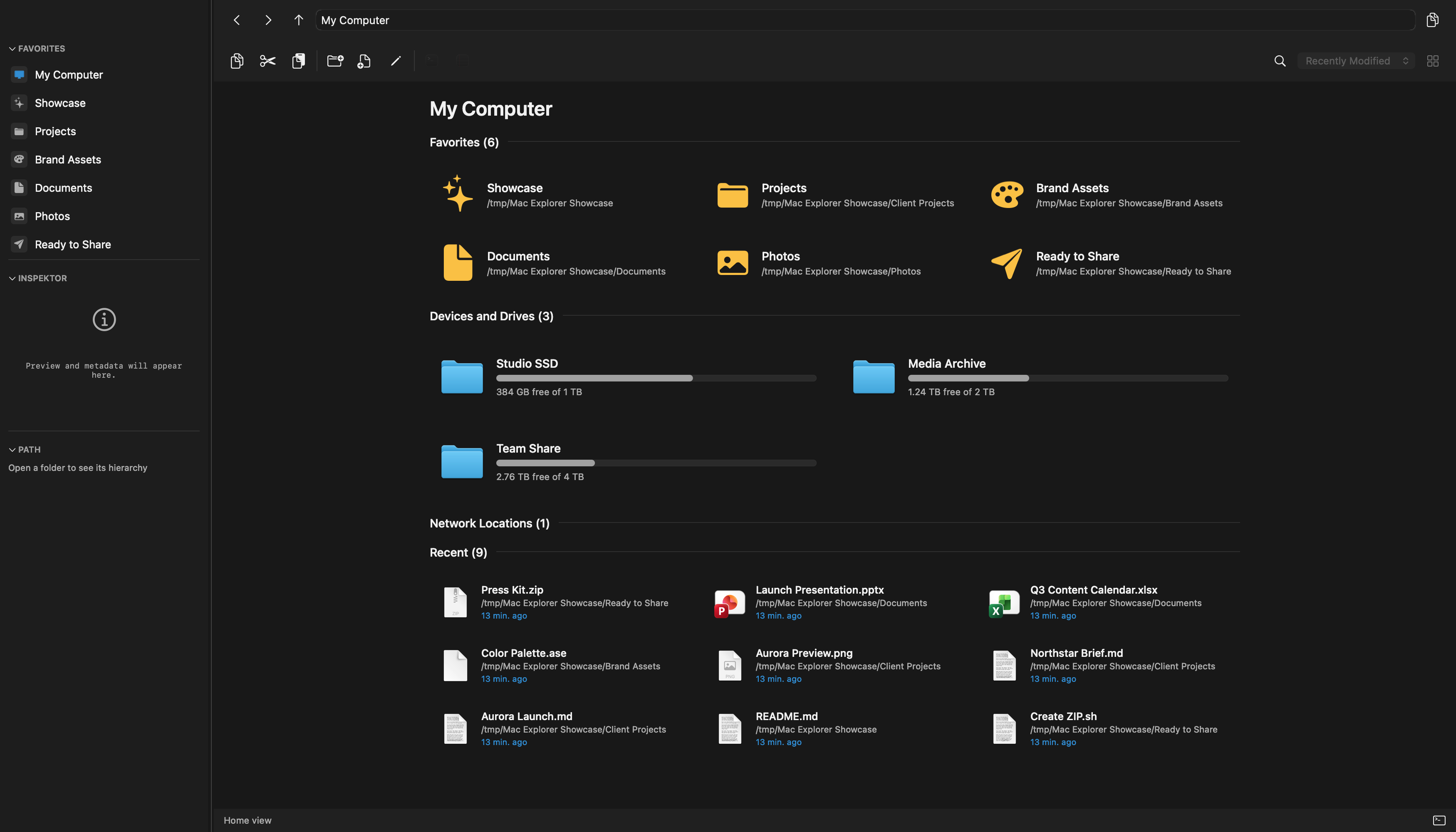
Windows File Explorer is Mac Explorer's main inspiration. For millions of people, its shortcuts, address bar, "This PC," folder tree, and direct operations are the natural way to work. From a Mac user's perspective, it has one fundamental limitation: Microsoft does not offer it on macOS.
What Windows File Explorer does well
File Explorer is deeply integrated with Windows. Win+E opens it anywhere,
Home and Quick access show pinned and recent locations, and "This PC" organizes
drives and standard folders. The address bar supports both clickable path
segments and direct text entry.
Its keyboard model is predictable: Enter opens, Backspace navigates back or up
depending on context, Delete removes, and F2 renames. Icon and Details views,
sorting, grouping, previews, context menus, tabs, OneDrive integration, and
Windows Search create a complete system file manager. The toolbar, shortcuts,
drag-and-drop, and Recycle Bin cover everyday file operations.
File Explorer also benefits from its platform: it understands Windows special locations, libraries, networking, SMB shares, and shell extensions. Mac Explorer cannot — and should not — reproduce those Windows-specific components one for one.

What Mac Explorer brings to Mac
Mac Explorer recreates the logic of interaction rather than the appearance of
Windows 11. Enter, Backspace, Delete, F2, mouse Back and Forward,
direct path editing, and "My Computer" preserve muscle memory after switching
systems. At the same time, the app uses native Mac technologies: AppKit, Quick
Look, system icons, Trash, Services, Quick Actions, Open With, and volumes
mounted by macOS.
It does not replace the Finder process or Open and Save dialogs. It is a normal app that can become the primary file manager while Finder continues to handle the system areas where Apple requires it.
Features standard File Explorer does not provide in the same model
Mac Explorer extends its inspiration for developers and power users with:
- an embedded terminal synchronized with the current directory;
- Git status, branch information, and branch switching in the sidebar;
- instant filename filtering with full regular expressions;
- MIME type,
chmod, owner, and group columns; - an Inspector with advanced metadata;
- apps and scripts as configurable toolbar or context-menu actions;
- comment-preserving JSONC with live reload and a native settings panel;
- complete undo and redo history for file operations.
Windows has Windows Terminal, PowerShell, Git, and an enormous shell-extension ecosystem. The distinction is that standard File Explorer does not embed these tools in one contextual interface. Windows Search has its own filters and syntax, but Microsoft does not document full regular expressions as an instant filename filter for the current folder.
What Mac Explorer deliberately does not copy
Mac Explorer has no tabs, Windows libraries, native Windows shell extensions, or Windows-specific OneDrive integration. These are deliberate limits: it borrows the interaction model without reproducing the Windows shell one for one. It is a Mac product, not a cross-platform clone.
For work beyond local disks, it can connect to OneDrive and more than 140 other cloud drives, object stores, remote servers, and protocols through its own cross-source layer.
Price, privacy, and performance
File Explorer is included with Windows. Mac Explorer is an additional app that costs $9.99. Someone staying on Windows has no reason to buy it; its value appears after choosing macOS.
File Explorer privacy cannot be cleanly separated from Windows, Windows Search, OneDrive, and diagnostic-data settings. A local file operation is not the same as a user-configured cloud connection. Mac Explorer's core has no account or telemetry; remote-source traffic goes to the providers the user configures, not to Mac Explorer for behavioral tracking.
Launch-time numbers are equally difficult to compare because File Explorer is
part of the Windows shell and Mac Explorer is a standalone app. Mac Explorer
publishes a measurement of 284.21 ms from main() to its first window on an M4
Max and loads expensive features lazily. A meaningful performance test would
require comparable hardware, folders, and scenarios on both systems.
Which one is for you?
On Windows, File Explorer is the natural included choice. On Mac, Mac Explorer brings across the most important parts of that experience and adds features that the original does not place in one window. Users who depend on Windows tabs and shell extensions should remember that this is not a one-for-one copy; people who need OneDrive can connect it alongside 140+ other supported sources.
Comparison table
| Feature | Mac Explorer | Windows File Explorer |
|---|---|---|
| Platform | macOS 14+, Apple Silicon | Windows 10 and 11; no macOS version |
| Price | $9.99 / 2 devices | Included with Windows |
| Role | Native Mac file manager inspired by Explorer | Windows system file manager |
| "My Computer" / "This PC" | Volumes, storage use, favorites, and recents | Native Windows integration |
| Enter, Backspace, Delete, and F2 | Yes | Yes, the original model |
| Address bar | Breadcrumbs plus direct editing | Breadcrumbs plus direct editing |
| RegExp | Full current-folder filename filter | No documented full RegExp mode in the standard view |
| Terminal | Embedded panel | Separate Windows Terminal or PowerShell; contextual integration, not a panel |
| Git | Status and branch in the sidebar | Not built into standard File Explorer; available through other tools |
| Custom actions | Local apps and scripts, GUI plus JSONC, toolbar and context menu, type and RegExp filters | Shell extensions, Send To, and external tools; a different model |
| Technical metadata | MIME type and POSIX owner, group, and chmod | Windows-specific metadata, ACLs, and system properties |
| Undo and redo | Dedicated operation history with safety warnings | System undo for supported operations |
| Cloud, storage, and server sources | 140+ included, including OneDrive, Google Drive, S3, FTP, SFTP, and WebDAV | Deep native OneDrive integration plus mounted network locations |
| Tabs | No — a focused single view | Yes in Windows 11 |
| Privacy | No core account or telemetry | Depends on Windows, Search, OneDrive, and diagnostic settings |
| Best for | Mac users who miss Explorer and want developer tools | Windows users who need the system file manager |